Data Management
Methods for Saving Chats
Methods for saving chats via API were discussed earlier, but you also have the option to export or save chats through the OpenWebUI interface. Clicking the three dots next to your icon in the upper-right section of the interface displays the options to either download or copy the chat session.
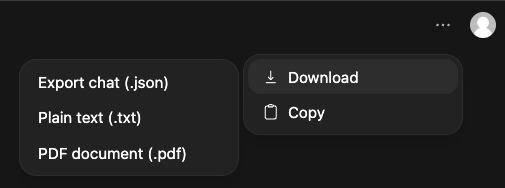
The chat can be downloaded in three formats (.txt, .pdf, .json). Saving as a .txt file stores only your prompts and the LLM’s responses/reasonings; however, saving as a .json includes metadata (e.g., timestamps, model, version, message IDs, etc), which may be useful in certain cases.
The “Copy” option copies only prompts, responses and reasonings, similar to what’s stored in the .txt file.
Storage Options
Downloaded browser chats will be saved to your local workstation but can be easily copied to HPC storage. If you’re saving chats on HPC storage it’s important to remember the limitations and use cases for each of RCs storage options. See our storage page for additional details.
Reproducibility Considerations
Reproducibility controls are important since LLM outputs can vary across different runs. This makes it impossible to verify results, replicate research, or trace back errors. The following are some important considerations regarding output reproducibility.
-
Temperature and Seed - Set
temperature=0and a fixedseedwhen consistency matters. Higher temperature introduces randomness. -
Prompt Versioning - Track prompts in versioned files since even small wording changes can affect outputs.
-
Saving Outputs - Save raw API responses with metadata (temperature, tokens, request ID) rather than just extracted text.
-
Context Window - Document the full context window, including system prompts, prior conversation history, and any retrieved content; exceeding the window silently drops content.